How to take holiday let deposits and balance payments automatically
Most holiday let owners who take direct bookings end up with the same arrangement: a deposit when the guest books, and the balance a few weeks before they arrive. It protects your dates without asking guests to pay for a summer holiday in January. It also means a list of balances to chase, unless you automate it.
This guide covers how to choose a payment schedule, how automatic balance payments work, and what to do when a payment fails.
Choosing your deposit and balance terms
A payment schedule comes down to two decisions:
- How big the deposit is. Usually a percentage of the stay. A bigger deposit is a stronger commitment from the guest; a smaller one makes booking easier.
- When the balance is due. A set number of days before check-in. The further ahead it falls, the more time you have to re-let the dates if a guest doesn't pay.
There's no single right answer. Think about how far ahead your guests book, how easily you could fill a late cancellation, and what's common for similar properties near you. Whatever you choose, show the terms clearly before the guest pays. Booking terms and conditions on the checkout page avoid arguments later.
For bookings made close to arrival, after the balance date has already passed, the guest normally pays the full amount up front.
How automatic balance payments work
The manual way is to take a deposit, put a reminder in your diary, then email the guest a payment link and hope they use it. The automatic way:
- The guest books and pays the deposit by card.
- Their card is saved securely with your payment provider (Stripe, for example) for the balance.
- On the due date the balance is charged to the saved card and recorded against the booking.
You don't send anything, and the guest doesn't have to remember anything. You only step in when something goes wrong.
When a payment fails
Cards expire, get cancelled or hit their limit, so a few automatic charges will fail. Make sure you'll know about it and the guest gets a prompt:
- Flag it clearly. A failed charge should show on the booking with the reason, not sit unnoticed in a payment dashboard.
- Retry. Some failures clear up on their own, so it helps if the charge is tried again.
- Remind the guest. A short reminder by email, SMS or WhatsApp with a payment link usually sorts it out, and it should stop as soon as they pay.
- Offer another way to pay. A bank transfer or PayPal option helps guests whose card won't go through.
Refunds and cancellations
Decide your cancellation terms before you need them, and match refunds to them. Many hosts offer a flexible, refundable rate alongside a cheaper non-refundable one, so guests choose the trade-off themselves. When you do refund, a full or partial refund back to the original card or PayPal account is cleaner than a bank transfer.
What about Booking.com and Airbnb bookings?
Bookings from channels follow the channel's own payment rules. Some channels collect the guest's payment themselves; for others you charge the guest. Keep track of which is which, so you never chase a guest for money a channel has already taken from them.
How it works in Stayant
Stayant runs the whole schedule for you. Switch on the payment schedule, set the deposit percentage and how many days before check-in the balance is due, and that's the set-up done.
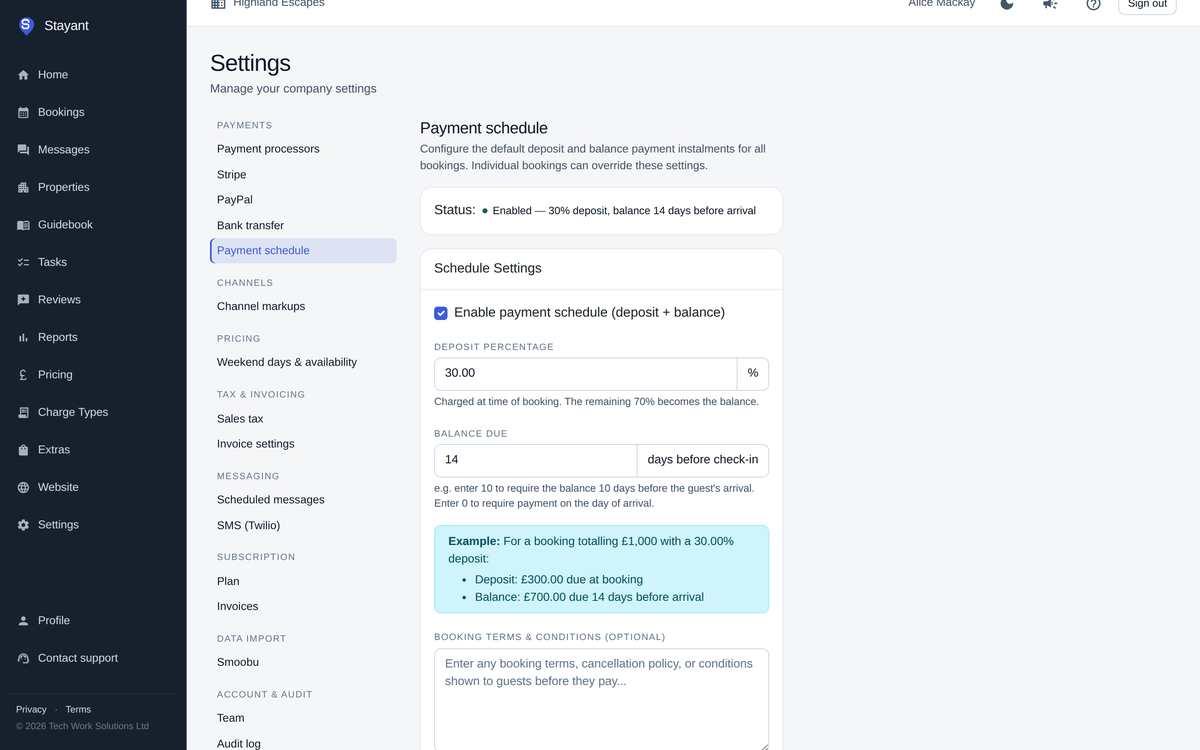
- Deposit at booking, balance on the due date. Guests pay the deposit through Stripe when they book on your website, and their card is saved for the balance. On the due date Stayant charges it and records the payment against the booking. Switch the schedule off and guests pay in full when they book.
- Your own accounts. Payments go through your own Stripe or PayPal account, so the money goes straight to you. You can also offer bank transfer, with Mark as paid when it arrives. Stayant charges no booking fees; Stripe and PayPal charge their usual processing fees.
- Failed payments are flagged. The booking shows Overdue, action needed, with the reason from Stripe, and Stayant tries again on its next run. You can also set up a daily balance reminder by email, SMS or WhatsApp that stops when the guest pays or arrives.
- Payment links and refunds. Copy or email a payment link to the guest, and make full or partial refunds for card and PayPal payments within the rate plan's cancellation policy.
- Channel bookings handled. Bookings paid through Booking.com or Airbnb are marked Paid via OTA and left out of reminders. If you want to, Stayant can charge cards that come through with channel bookings on their due dates; that's off by default.
Guests can see their payment schedule and pay any balance from their guest portal. The help centre has a step-by-step guide to setting up a payment schedule, and the payments page has the full detail.
The short version
Pick a deposit percentage and a balance due date that suit how your guests book, and show the terms before they pay. Then let the balance be taken automatically from the saved card, with failed payments flagged and the guest reminded. That turns balance chasing into an exception rather than a weekly job.