Direct bookings for holiday lets: a practical checklist
Every booking that comes through Airbnb or Booking.com costs you the channel's commission. Every booking made directly with you doesn't. Few owners can, or should, drop the big channels altogether: they bring guests who would never have found you. But each guest you can move to booking direct is worth more to you, and is more likely to come back.
This checklist covers what a guest needs to book with you directly, and what brings them back next year.
1. Have somewhere guests can actually book
A Facebook page or a website with "email us for availability" loses guests who are ready to book now. A direct booking site needs:
- Live availability, so guests can see which dates are free without asking.
- An instant price for their dates and number of guests, fees included.
- Online payment, so the booking is confirmed there and then.
If availability on your website isn't connected to your channels, you'll be updating it by hand and risking double bookings. Make sure your website and your channels share one calendar. Our guide to channel managers explains how.
2. Use your own domain
A web address with your property's name in it is easier to remember, easier to put on a business card or a welcome folder, and looks more trustworthy than a subdomain of someone else's site. It's what returning guests will type in, or search for, next year.
3. Make it easy to find on Google
Guests often look up a property's own name after seeing it on a listing site. Make sure they find you:
- Give each page a clear title and description that say what and where the property is.
- Have a sitemap so search engines find every page.
- Make sure each property page shows a proper preview (title, description and photo) when someone shares the link.
- Use your own photos and words, not a copy of your Airbnb listing.
4. Be clear about the full price
Hidden fees put guests off at checkout. Show cleaning fees, pet fees and any extras before the guest pays, and say whether the price includes VAT. Optional extras, such as firewood, a welcome hamper or late check-out, are a good way to add value and revenue to a direct booking.
5. Take payment the way guests expect
Card payment is the minimum. Many guests also expect Apple Pay or PayPal, and some prefer a bank transfer for a long stay. For bookings made well in advance, a deposit with the balance taken automatically later makes booking easier. See our guide to deposits and balance payments.
6. Answer questions before they're asked
A short FAQ on your website saves you emails and reassures guests: check-in times, parking, pets, Wi-Fi and what's provided. Add a contact form or a WhatsApp button for the questions an FAQ can't answer. A quick reply often wins the booking.
7. Show your reviews
Guests trust other guests. Ask every guest for a review after their stay and show the good ones on your own website, so direct visitors see the same reassurance they'd get on a listing site.
8. Look after guests once they've booked
A smooth stay is what turns a one-off guest into a returning one: confirmation straight away, a reminder before arrival with directions and check-in details, a guidebook with the Wi-Fi password and local tips, and a thank-you after they leave.
9. Give returning guests a reason to come direct
The best direct bookings come from guests who have stayed before. Make sure they know they can book with you directly next time. Your thank-you message, guidebook and welcome folder are good places to put your website address.
How Stayant helps
Stayant includes a direct booking website, with no commission on direct bookings:
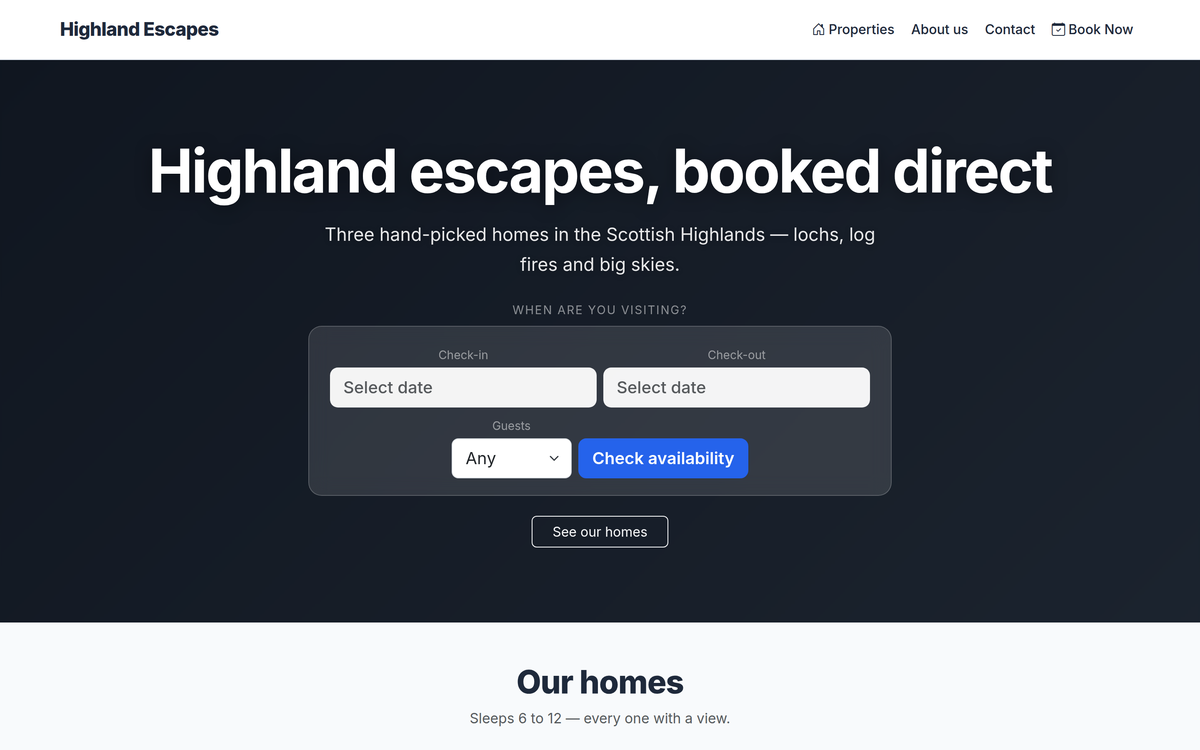
- A booking website from blocks. Start from one of eight designs and add a hero banner, property grid, availability search, gallery, reviews, FAQs, map and more. Availability and prices come straight from Stayant, so your website and your channels share one calendar.
- Your own domain, set up for Google. Connect your domain with a couple of DNS records. Stayant creates your sitemap, sets page titles and descriptions, and gives each property a proper preview when it's shared.
- Book and pay online. Guests search by dates and number of guests, see the price for their stay, add extras and pay with the methods you offer: card through your own Stripe account, PayPal or bank transfer.
- Questions answered. A contact form and a WhatsApp chat button, with website enquiries landing in the same inbox as your guest messages.
- Reviews after every stay. The day after check-out, Stayant emails the guest a link to leave a review, and you approve reviews before they appear on your website.
- Guests looked after. Scheduled messages go out before and after each stay, and every booking gets a private guest portal with online check-in and your guidebook.
Already have a website you're happy with? Stayant has an embeddable booking widget you can add to it. The booking website page has the full detail.
The short version
Give guests a site where they can see live availability, get the full price and pay there and then, on your own domain, easy to find on Google. Then look after them well and make sure they know to come straight to you next time. Keep your listings on the big channels for new guests, and let your direct bookings grow alongside them.